


| Summary: This article explains eight early signs of Odoo implementation problems, including repeated go-live delays, budget overruns, excessive customization, unreliable integrations, inadequate testing, and poor vendor communication. It explores the root causes behind these issues, how to distinguish normal challenges from ERP project failure signs, and what business owners can do to address Odoo implementation issues. Learn how to assess project risks, prepare for an independent Odoo audit, and decide whether to fix the existing implementation or change partners. |
Have you ever been in a situation when your seemingly successful Odoo implementation project stopped flowing smoothly?
Usually, it looks like this: Your status meetings show everything is on track, but your release has been postponed for the third time, the budget gets extended, and you start feeling like something’s off, even though you don’t have obvious signs of disaster.
Naturally, such feelings may seem trivial when the Odoo implementation is slower because of complex integrations. But sometimes, those indications are the first signs of an upcoming failure.
In this article, we will discuss the early signs of failed ERP implementation. You will learn how to distinguish regular implementation difficulties from signs of a broken project, when to step in, and how to prepare for a conversation with your vendor.
We hope this article helps managers and business owners who feel their Odoo implementation project is going wrong but can’t quite tell whether such thoughts are just worries or, instead, real warnings of a situation that needs intervention.
Eight Warning Signs Your Odoo Project Is Going Wrong
All the successful Odoo projects are alike. The unsuccessful ones differ, but these differences often fall under some common scenarios.
Having helped numerous businesses recover their Odoo implementation projects, we have shortlisted the early signs that usually precede project failure. Here we describe how they look and explain why they are dangerous:
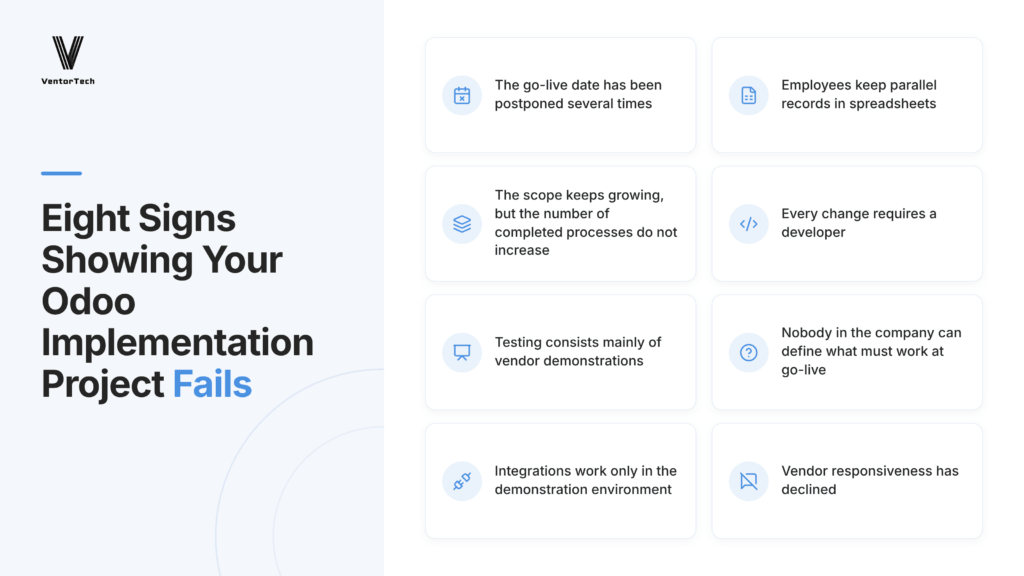
The go-live date has been postponed several times
Postponing the release date is not pleasant, but sometimes Odoo implementation steps are rescheduled because business conditions or the scope change. However, if the release date has been postponed several times, it may signal a problem within your vendor’s team.
This may mean that the project scope lacks control over delivery and quality. It may also signal unresolved blockers and dependencies that might slip into the release but block future program work.
Employees keep parallel records in spreadsheets
Your personnel are usually the best team to test each new product. When the system isn’t implemented correctly, using it becomes uncomfortable, or at least no more comfortable than sticking to the tried-and-proven old system.
Often, employees notice that the new system’s data isn’t accurate and keep the old records as the ultimate source of truth.
Dev teams may explain this as inertia or resistance to change. Lessons and extra onboarding hours are offered. Yet, if everything worked as intended, the team wouldn’t resist the innovation.
The scope keeps growing, but the number of completed processes does not increase
If you add new features on schedule but don’t see their real impact on processes, it may indicate that the implementation will fail.
Every new feature or adjustment should immediately reflect in how your team completes processes from beginning to end. If you add new features but achieve no organizational value, it means that something is wrong.
Every change requires a developer
With proper implementation, most business tasks should be manageable through standard system configuration.
If every change requires a developer, it means these configurations were skipped during implementation, and your product will also not work properly in the future.
This will inevitably lead to higher costs, budget overruns, and heavy dependence on the development team.
Testing consists mainly of vendor demonstrations
In this scenario, testing certain features usually takes the form of sessions with vendors, where they show how the selected features work.
At the same time, your employees are not testing the entire business scenario against the previously specified acceptance criteria. Your system remains undertested, and your vendor knows it.
As a result, the project will be declared complete, but it will still have gaps that hinder the real business process.
Nobody in the company can define what must work at go-live
When no one in the company can clearly state which operations must transform at go-live, the implementation was planned wrong from the start.
Successful completion should not just be a fulfilled list of features. It should also drive a clear transformation of business processes that now run faster, require less effort, or involve fewer resources.
This list of features that must work at go-live shouldn’t just be scattered through emails, meeting notes, or messages between individual team members. They should be well-defined from the start.
Integrations work only in the demonstration environment
In this scenario, you can see that the connections to other systems work well during vendor demonstrations, but you haven’t received any real evidence that they work in the real-life environment when tested by your employees.
You should be able to see how data flows, errors get handled, and how end-to-end transactions are validated in realistic conditions.
If this doesn’t happen, critical processes may fail after the ERP launches, when the system exchanges data between financial, warehouse, and sales systems.
Vendor responsiveness has declined
This situation looks like this: At the beginning of the project, the team was responsive, and communication was clear and on schedule. But later, the wait for callbacks became longer, and the initial team changed significantly.
Slower communication and unexplained staffing changes may stem from capacity issues or lost project knowledge when experienced people leave.
Separately, any of these ERP implementation warning signs can happen at any point in a project. Yet if you have encountered three or more, you will need to step in; otherwise, the implementation is likely to fail.
What Lies Behind These Signs?
There can be different reasons why Odoo implementation fails. Yet in many cases, the business itself shares responsibility, and the mistakes we discussed are quite common. Given such similarities, we can break down the situations that lead to a failed Odoo implementation into three categories.
In the first-case scenario, a company agrees to a customized approach for the implementation, instead of following the standard process. Let’s keep in mind that standard processes are tried and tested; if they work for one company in the niche, they will most likely fit others. If your vendor guides you into a customized approach, you step into unknown territory, which may result in extended budgets and timelines, things you never predicted or were warned about.
In the second scenario, companies often hire vendors with Odoo implementation expertise, but they don’t have experience in your niche. As a result, the code is correct, but the core processes don’t work.
Therefore, when hiring a vendor, it is important not only to discuss what you need to implement but also to discuss their vision for how these implementations will affect operations.
In the third common case, no project owner is appointed. The project owner should have a clear picture of the final implementation and the acceptance criteria to follow. If the project organization doesn’t have any, the project structure will most likely fall apart.
As a client, you certainly can take on responsibility for a failed Odoo implementation project, and you can do everything possible to improve it.
If you see your project starting to fail or it looks like it’s not running as you expected, there are several things you can do to find a way out.
What Can You Do in a Week to Save Your Project as a Business Owner?
If you see the project failing and you didn’t get what you paid for, you may approach your vendor and demand that they fix weak links or give you a refund.
This will be a tough conversation, so prepare by doing your homework and collecting facts and numbers.
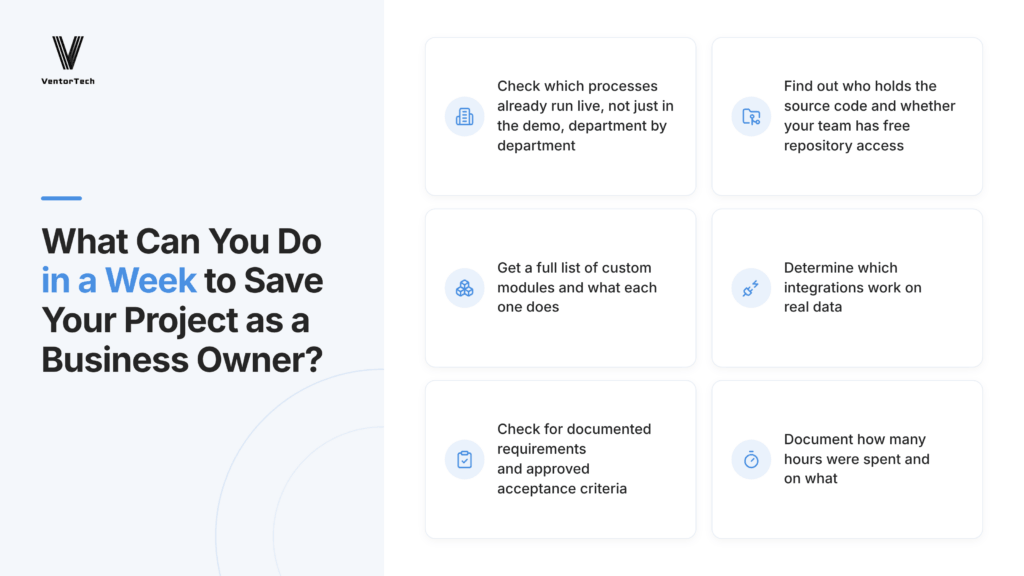
Here are the things that you can check for in the first turn:
- Find out how many processes already work in the live version and not in the demo. Check these processes by department.
This way you’ll see clearly how the implementations stand up to their promise and what points of your initial plan were not performed. Having a clear list of processes that are working and those that have failed will give you a strong argument when you demand a fix or a refund.
- Establish who keeps the source code and if your team has free access to the repository.
Ideally, you should own everything you pay for and have access to the materials from the start for a clear progress overview. If you don’t have free access, then you don’t have the product you pay for.
- Get a full list of custom modules and their functionality.
You should keep track of everything created outside the common offering of the platform. If you order custom modules, there should be a clear reason for them and obvious business value.
Also, each custom module should be accounted for, and you should have transparent visibility on their status of development, to include proper documentation.
- Determine which integrations work on the real data.
All the integrations should work in the real business environment, not just in demos. Check which of them are already working and how they perform in the real-life environment.
- Find out if there is a list of requirements documented and if there are acceptance criteria approved.
This basic documentation should be agreed on at the very beginning of the project and establish its backbone. So, with this step, you should get this list of requirements of which you and your vendor agreed on.
- Document how many hours were spent and what they were spent on
For this step, you should carry out an audit of the tasks done so far and calculate whether your spending matches the budget agreed on. This financial report will be your basis if you decide to claim a refund.
These steps are necessary to help you save your project. Whether you require improvements or want to stop the contract and receive a refund, you have to speak with clear facts and deep visibility on the project’s current status in order to move forward to the next steps.
What’s Next? Three Scenarios
Based on your findings from the tasks described above, there are three scenarios for your next actions, which will ultimately bring you to saving your project with your vendor or hiring Odoo project rescue services that may take the process from your vendor and complete what you need to be done.
- Ask your current partner for improvement
If your audit showed the issue and your vendor is ready to improve it, you both may agree to remove the bottlenecks and continue the implementation.
- Ask a third party to run the audit
This scenario is often used when you feel that there is an issue but can’t identify where it is. In that case, you may ask an independent party to step in and show you the way out.
- Change your vendor
If your vendor is not willing to improve, doesn’t answer your calls, and doesn’t share regular feedback, these are signs to change your Odoo partner.
Summing up
If you feel that your Odoo implementation project isn’t meeting expectations, then follow the advice in this article and check the eight signs of a project moving toward failure. Take note of what resembles your situation. If you found three matches, then conduct an audit of your project. Start by choosing an Odoo consultant who can provide a basis for a weighted decision and advise you on how to save your implementation.
Facing Odoo Implementation Issues?
Get an independent audit to identify problems and find the best path forward.
Recommended articles:
- How a UAE Auto Parts Retailer Accelerated Growth With Odoo
- ASBIS: From Legacy ERP to Odoo – A Large Enterprise Transformation
- How a US Repair Company Scaled Up After Migrating from a Legacy System to Odoo
- U.S. automotive company: 15X Growth with Odoo
- From Manual to Automated: How Odoo ERP Helped a Swiss IT Service Company to Grow Turnover 2.5 Times
- Odoo and Ventor solution for 27 Finnish stores: from manual inventory management to fully automated WMS
- How Odoo implementation automated 10 months of manual work and saved over €22K annually
- Odoo Success Story: From Budget Overruns to a Profitable Tech Company in Just 6 Months
- 10 most common questions to the official Odoo partner
Image by DC Studio on Magnific

----------------------------------------------------------------------
Education: Bachelor's degree.
----------------------------------------------------------------------
Experience:
Marketing manager
VentorTech
----------------------------------------------------------------------
Current position: Marketing manager VentorTech
----------------------------------------------------------------------
B2B Marketing
Google Tag Manager and GA



0 Comments